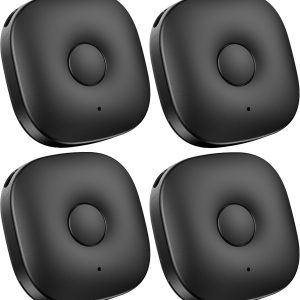
Key Finder,Smart Tracking Device with App Control,Bluetooth GPS Tracker Locator,Wireless Item Finder for Keys,Wallet,Phone,Luggage, Doll,4 Set
Your Lease Ownership Plan
est. $3 /week*
62.387
Get it now and rent as you go. The item is yours after renting for 12 months or buyout early anytime. No down payment, no commitment and return/cancel anytime.
Rental Payment / 2 weeks: est. $6.00*
All lease payments apply to the ownership cost.
Ownership Options & Cost (before tax)
100-Day Price: $62.39*
Lease-to-Own: 26 bi-weekly payments over 12 months.
Early Buyout Price: After 100 days, buyout with a one-time payment of 50% of your remaining ownership balance.

DELIVER TO YOUR DOOR OR IN-STORE PICKUP*

LEASE TO OWN WITH NO CREDIT NEEDED*
- Details
- Reviews (0)
- Q & A
Description
Product Description
Q&A
1. Q:How can i link my Smart Tag to a different account?
A:You need to unlink it from previous account first.Simply login to the last account in the Zenlyfe APP,delete the Smart tag object.
2. Q: Why can’t my Smart Tag be found in the APP?
A: It’s likely your smart tag is in sleep mode.Press and hold the button to activate it first.
3. Q:Why does my Smart Tag sometimes beep randomly?
A:1. If you have separation alert set up. The tag will beep when losing bluetooth connection to the phone due to various reasons.,you can turn on the silent mode feature to avoid false alert indoor.
2. If your tag beep after by dropped or shocked,please open it and reinstall the battery.
4. Q:Do i need keep the APP running all the time?
A:You can choose to only run the APP when you are trying to find the tag.However, there are many advanced features,like separation alert,keeping last seen location,requires the APP running all the time.The APP has optimized for running at background without draining battery.
One of a Slim, elegant Bluetooth Tracker
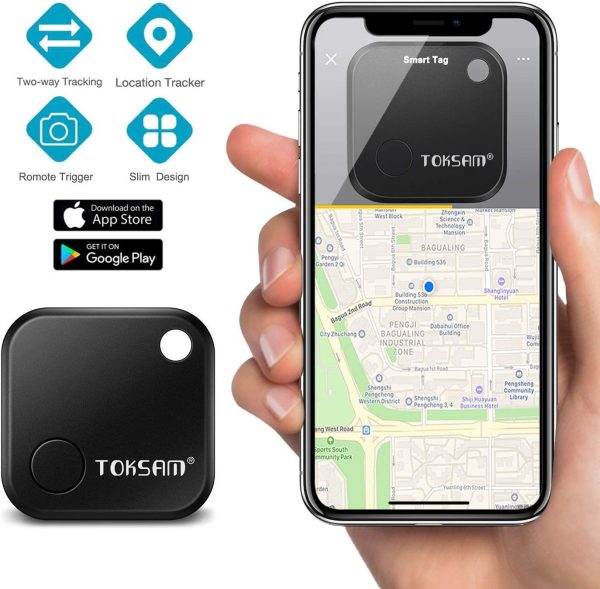
TOKSAM key finder easily attached to almost anything, even stick the smart tag to any flat surface, one touch look and find this matters. And can be use as Bluetooth remoter for selfie.
The free app Swiftfinder / Zenlyfe
The free app can be download from iOS/Android app store, easy to install and pair.
Main feature
- Idea gift
- Locate and tracking
- Support iOS siri, Google assistant, Amazon Alexa
- Group share
- Volume control, upto 85db
- Battery-replaceable
- Anti-lost and silence setting
- Community Finding
|
|
|
|
|---|---|---|
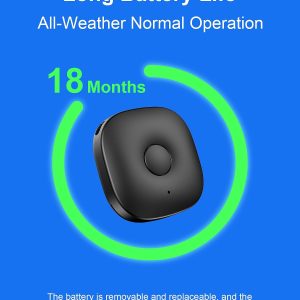
Battery-replaceableLong battery life, and the battery can be replaced by user as needed. |
Customize your own ringtoneYou can easily customize each Smart Tag’s ringtone and even create your own ringtones to meet your taste. |
Bluetooth selfie remoterControl your phone’s camera. Take the perfect selfie or group photo every time. |
Compatibility
- Supported Apple Devices using iOS 9+: iPhone (Released 2017 or newer): 4S, 5, 5C, 5S, 6, 6 Plus, 6S, 6S Plus, 7, 7 Plus,8,X,XS,11; iPad (Released 2017 or later): 3rd Gen, 4th Gen, Air, Pro; iPad Mini; iPod Touch 5th gen and above; Apple Watch (your iPhone must be running iOS 9 or higher to support the Apple Watch)
- Supported Android Devices using 4.4 or higher: Samsung Galaxy: S5, S6, S7, S8; Samsung Galaxy Note 4, Note 5;
- If your device is not on this list but uses Android 4.4 and Bluetooth 4.0, there is a good chance TOKSAM smart tag will work fine, but we are not able to offer the same level of support in troubleshooting scenarios.
Tips for Android Phone
1. System Settings: In order to make smart tag working properly, it is important to keep the ZenLyfe app running in background. Android phone may close apps running in background. Please turn off “Manage Automatically” for the ZenLyfe app to avoid it from being closed by the phone.
2. The Bluetooth module in Android phone may freeze from time to time. If you noticed that the tag is not connected with the ZenLyfe app even if it is close to your phone, please restart Bluetooth on your phone.
3.Any problem with the key finder, feel free to contact our technical support.Help center in our Zenlyfe App will respond you in 12 hours.
- Ring your things and find it, the Bluetooth GPS tracker designed with a convenient hole to loop onto keychains, wallet, doll, toy or drop in your bag, purses. Use the free app at your smartphone to make your TOKSAM key finder ring when it’s nearby but out of sight. And you can customize your own Ringtone.
- Find your phone: Simply double press the button on your tracker to make your phone ring even on silent. Tips: pleasemake sure the app SwiftFinder/Zenlyfe always running in your phone.
- Tip:Design for IPHONE and SAMSUNG Smart phone, it is important to keep the Swiftfinder/ZenLyfe app running in background. 1)For Android users,Android phones may close apps running in background. Please turn off “Manage Automatically” in your settings for the ZenLyfe app to prevent it from being closed by your phone.2)The Bluetooth module in Android phones may freeze from time to time. If your tag is not connected with the App even very close to your phone, please restart Bluetooth on your phone.
- Support siri, Google assistant and Amazon Alexa, works on Apple iOS 9.0+ and Android 6+ , Bluetooth 6+ or BLE. Can share with your friend, family, but only one can connected at same time.
- 100% 1 Year Guaranteed.no-questions-asked, money-back guarantee.Search “SwiftFinder” on Youtube to learn more about the product operating instruction.
Only logged in customers who have purchased this product may leave a review.


Reviews
There are no reviews yet